
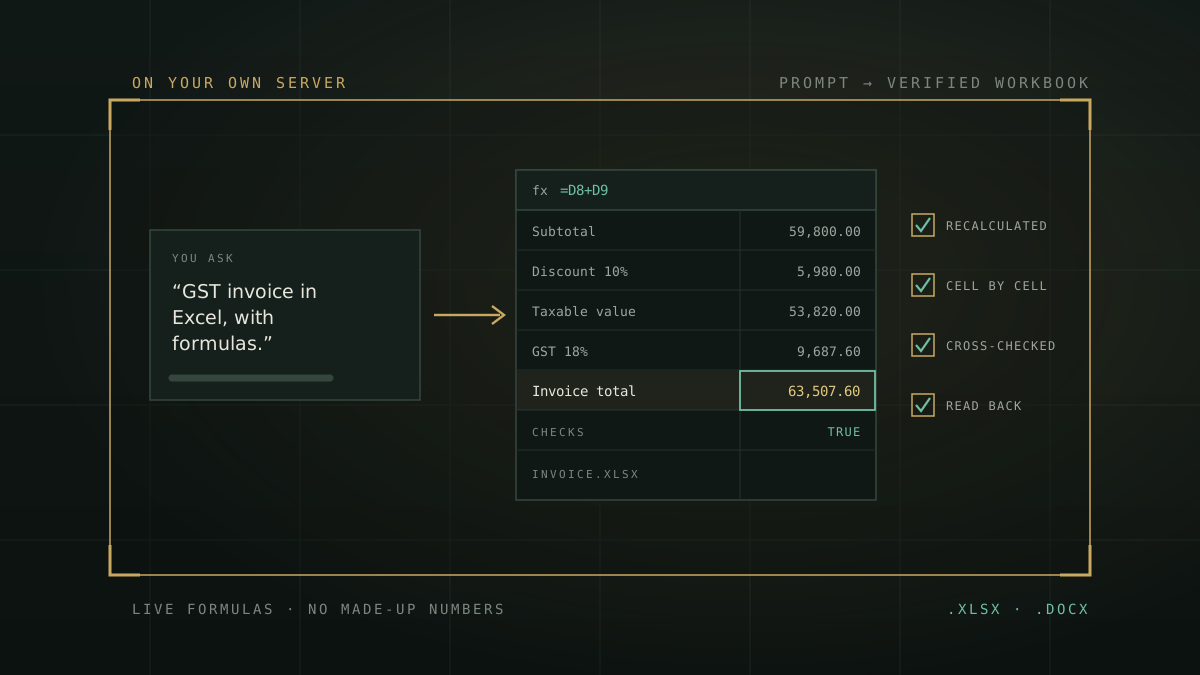
Short answer: yes. You can type “make me a payroll sheet in Excel with formulas” into an AI assistant today and get a real .xlsx file back, not just a table pasted into a chat window. The harder question is whether the numbers in it are right. A spreadsheet that looks tidy and adds up wrong is worse than no spreadsheet, because people forward it.
Most advice on this topic ends with “always double-check the output.” Fair enough, but check what, exactly? Here are five concrete checks you can run on any AI-made workbook in a couple of minutes, a test prompt with known answers, and a word on where your salary data goes while all this happens.
What AI can actually do with Excel now
Two very different things get called “AI for Excel”, and it helps to keep them apart:
- Formula helpers. You describe a calculation and get back one formula to paste into your own sheet. Useful, low risk, and you stay in control of the file.
- File builders. You describe the whole job (“GST invoice register for September with a grand total”) and get a finished workbook to download. This is where the time savings are, and also where things quietly go wrong, because you didn’t write any of it.
The rest of this piece is about the second kind.
Five checks for any AI-made workbook
1. Are the formulas live, or just numbers?
Click on a total. If the formula bar shows =SUM(D5:D9) or similar, it’s live. If it shows 63507.6, someone (or something) worked out the answer elsewhere and typed it in. A pasted number won’t update when you fix a typo in row 6, and it can’t be traced back by an auditor. For anything you’ll reuse next month, live formulas aren’t optional.
2. Was it ever actually calculated?
This one surprises people. A model can write a formula without anything ever running it. The first time the formula meets a spreadsheet engine is when you open the file, and that’s when #REF!, #DIV/0! or a circular reference shows up. Open every sheet and scan for error values before you do anything else. A trustworthy tool does this step for you before handing the file over.
3. Where did each number come from?
If you gave five employees’ salaries and the sheet has seven rows, ask why. Language models are very good at producing plausible filler: a sample invoice, a “typical” rent figure, an extra month. Your inputs should be easy to spot and easy to trace back to your request. Sample data is fine when you asked for a template, as long as it’s clearly labelled as sample data on every sheet.
4. Does the formula mean what you asked?
This is the subtle one. The arithmetic can be perfect and the logic still wrong. Common examples:
- GST worked out on the amount before the discount instead of after.
- A “Total” row that sums the unit price column, which means nothing.
- An EMI that uses the annual rate where it needed the monthly one.
- A chart that plots rupees and quantities on the same axis.
None of these throw an error. You only catch them by checking one or two key figures against a calculator, which brings us to the test below.
5. Where did your data go?
A payroll sheet has names, salaries, sometimes PAN and bank account numbers. That’s personal data under India’s DPDP Act, 2023. Before you paste it into any AI service, check its data terms and your own organisation’s policy. The easiest position to defend is one where the AI building the workbook runs on infrastructure your organisation controls. We’ve written more about where enterprise AI leaks if you want the longer version.
A spreadsheet that errors out is annoying. A spreadsheet that quietly adds up the wrong thing gets approved.
A GST invoice test you can run on any tool
Paste this prompt into whichever AI you’re evaluating and ask for an Excel file:
Here’s what a correct workbook has to show:
| Line | Amount (Rs) |
|---|---|
| Subtotal (25,200 + 23,400 + 11,200) | 59,800.00 |
| Discount at 10% | 5,980.00 |
| Taxable value | 53,820.00 |
| GST at 18% | 9,687.60 |
| Invoice total | 63,507.60 |
If you see 64,584.00 as the total, the tool charged GST on the full subtotal and took the discount off afterwards. Every cell is “correct” arithmetic and the invoice is still wrong. That’s check number four in action.
Want a second test? Ask for a loan EMI schedule: Rs 10,00,000 at 9% a year for 24 months, reducing balance. The EMI should come to Rs 45,684.74 and the total interest to about Rs 96,433.81. Then click the EMI cell and see whether it’s a formula.
How to ask so you get it right the first time
Whatever tool you use, these habits make mistakes much less likely:
- Give every figure directly. Say “24 months”, not “2 years”. Say “CGST 9% and SGST 9%”, not “18% split equally”. Every conversion you leave to the AI is one more place it can slip.
- Say the order of operations. “Discount first, then GST” removes the most common invoice mistake.
- Name what you want worked out. Totals, averages, variance, balance due, the highest item. Otherwise you get whatever the model thought was interesting.
- One workbook per request. Start a fresh request with all the figures rather than stacking edits on a sheet you just got.
- Ask for “with formulas”. It sounds obvious. It still matters with some tools.
Hindi aur Hinglish mein bhi chalega
You don’t have to write in formal English. A shopkeeper’s prompt like this one is perfectly good, as long as the figures are all there:
The right answer: chai Rs 12,000, samosa Rs 12,750, biscuits Rs 6,000, cold drinks Rs 16,800, for a total of Rs 47,550, with cold drinks earning the most. Same five checks apply.
How ZenithAI handles it
We built ZenithAI’s Word and Excel file generation around the first four of these checks, and it runs on your organisation’s own servers. When you ask for a workbook:
- Totals and calculated columns are live Excel formulas, so the file recalculates when you change an input.
- The finished file is recalculated in an isolated, sandboxed spreadsheet engine on your own server, and every formula result is compared with an independent calculation of the same figure.
- A separate cross-check works out the key results straight from the numbers in your request, and a read-back checks each figure against what you actually asked for. That’s the step meant to catch a figure with the right arithmetic but the wrong meaning.
- Your inputs are marked in blue with their source, a Summary sheet explains how each key figure is calculated, and a Checks block shows TRUE when everything is consistent.
- It’s built not to invent figures. With no figures, it asks for them or builds a template stamped “SAMPLE FIGURES” on every sheet.
- If a check fails, you don’t get the file. You get a plain sentence saying what couldn’t be verified.
It works in English, Hindi and Hinglish, and it runs on your organisation’s own servers. The same assistant writes Word documents too: offer letters, memos, invitations, quotations and reports, each in its proper layout.
It has limits, and we’d rather you hear them from us. It won’t yet convert “2 years” into 24 months for you, follow-up edits like “add a column” don’t work reliably yet, and it will sometimes decline a request it can’t verify rather than guess. We think a polite “I couldn’t verify this” beats a confident wrong number.
When a general-purpose chatbot is fine
To be fair about it: plenty of spreadsheet jobs don’t need any of this. If you want one formula explained, a quick template for a personal budget, or help with a VLOOKUP on data that isn’t sensitive, a public AI assistant is quick and perfectly good. Run check one and check two and get on with your day.
The calculus changes when the sheet holds other people’s salaries, customers’ tax details or numbers someone will sign off on. That’s when verification and where the processing happens stop being nice-to-haves.
Frequently asked questions
Can AI create Excel files with formulas?
=SUM(D5:D9), the formula is live. Whether the formulas are right is a separate question, so check the result before you rely on it.Why are AI-generated Excel formulas sometimes wrong?
Is it safe to upload salary or payroll data to a public AI chatbot?
Can AI make a GST invoice in Excel with CGST and SGST?
AI se Excel sheet kaise banaye?
Can the same AI create Word documents too?
The bottom line
AI that builds Excel files is real and genuinely useful. The difference between a helpful tool and a risky one isn’t whether it can write =SUM(). It’s whether anything checked the result before it reached you, and where your data was while that happened.
If you’d like to see the five checks on your own paperwork, request a demonstration and bring the payroll sheet or GST register your team makes every month. Or browse the Word and Excel example prompts first.