
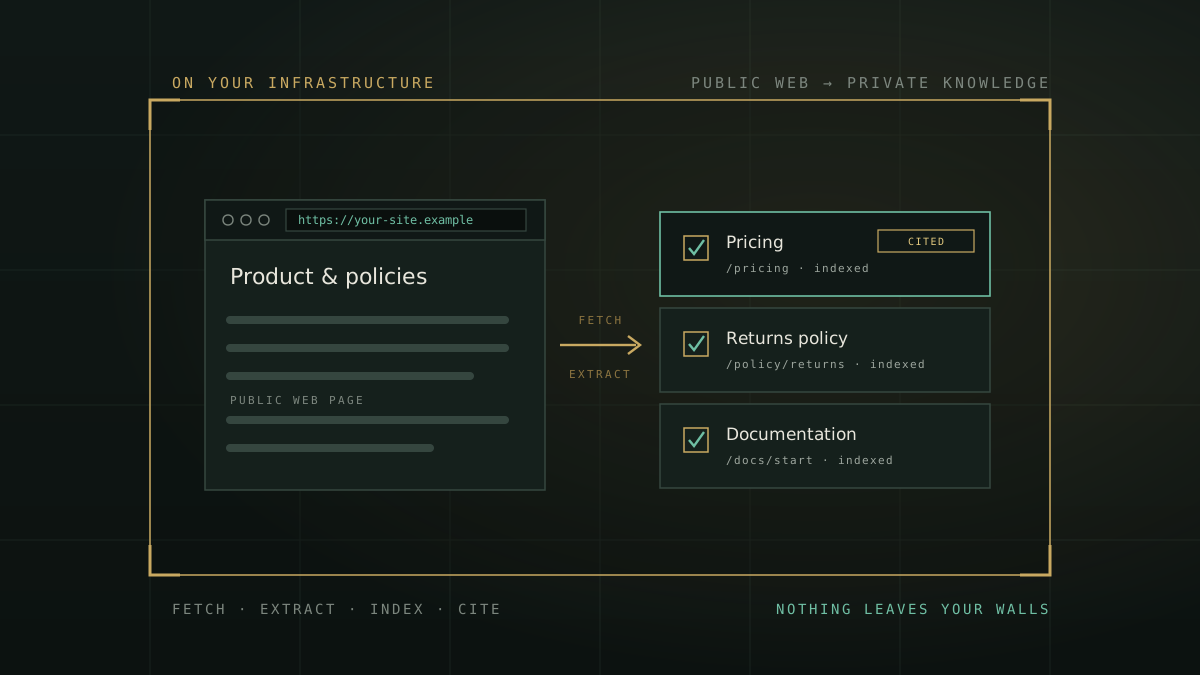
Your website is already your clearest, most current explanation of what your organisation does — product pages, documentation, policies, FAQs, scheme details, terms. So it is a natural instinct to want an assistant that can answer questions straight from it: “What does our returns policy say?”, “Which plan includes priority support?”, “What are the eligibility criteria for this scheme?” Turning a website into an AI knowledge base is one of the easiest AI wins to imagine — and one of the easiest to get quietly wrong.
The part that is easy to demonstrate is the retrieval. The part that decides whether it belongs anywhere near a bank, a hospital, a government department or any regulated enterprise is a quieter question: where does your content go, and where does every question your staff type go? This piece walks the actual workflow, sets out what “good” looks like, and shows how to do it without any of it leaving your infrastructure.
What “website to knowledge base” actually involves
Behind the friendly phrase sits a specific pipeline. Whatever tool you use, the same five steps happen in some form:
- Fetch. The system downloads the page, or a set of pages on the same site.
- Extract. The raw HTML — navigation, ads, scripts, boilerplate — is stripped down to the readable content that a human would actually care about.
- Index. That clean text is split into passages and turned into a searchable form, so a question can find the right passage later.
- Retrieve. When someone asks a question, the most relevant passages are pulled back.
- Answer — ideally with a citation. The assistant composes a reply grounded in those passages, and, if it is built honestly, tells you which page each statement came from.
That is the whole trick. It is the same pattern that powers “chat with your documents”; a website is just another source of text. And notice what the end state is: not a search box bolted onto your site, but knowledge your team talks to in plain language. Which is exactly why the interesting differences between tools are not in the demo — they are in the boundary the pipeline runs inside.
The retrieval is the easy part to show. Where your content and your questions physically travel is the part that decides whether the tool is safe to use.
The question the shiny demo skips
Most hosted “chat with your website” services work by sending your content — and then every question your team asks, and often the answer too — to a third-party cloud, frequently one built on a proprietary model provider. For a public marketing page, that may be no great loss; it is public already. But two things travel with it that are not so casual:
- The questions. What your staff ask reveals what you are working on, worried about, or planning. A stream of internal questions is sensitive even when every source page is public.
- The habit. A tool that reaches off-site for public pages is one configuration change away from doing the same with an internal document. The safe posture is one where reaching outside is simply not how the system works.
For a regulated organisation this also collides with the direction of the rules. The DPDP Act, 2023 puts real obligations on how personal data is processed and accounted for, and sectoral guidance such as the RBI’s 2026 draft on model risk expects you to be able to explain and oversee your AI. Both get harder the moment your workflow depends on an outside service you do not control. None of this says “don’t build a website knowledge base.” It says: build one whose answer to “where does this run?” is “here.”
What good looks like: seven things to insist on
If you are evaluating any way of turning web content into an AI knowledge base — built, bought or subscribed — hold it against this list:
- It runs on your side of the wall. Fetching, extraction, indexing, retrieval and the answer itself all execute on infrastructure you control, with no third-party API in the path.
- It stays on the site you chose. A crawler that follows links wherever they lead is a liability. It should stay same-site and refuse redirects that try to leave.
- It only touches the public web. The importer should refuse internal, loopback and cloud-metadata addresses outright — not as a setting, but as a rule — so it can never be pointed at your own internals.
- It is bounded. Hard limits on pages and bytes, enforced while downloading, so a broken or hostile page cannot run away with your server.
- It cites its sources. Every answer should name the page it came from, with a link, so any statement can be checked before it is trusted or acted on.
- It treats page text as data, never as instructions. A fetched page must not be able to smuggle in commands that change what the assistant does — the classic prompt-injection risk when you ingest arbitrary web content.
- It is honest about what it got. Discovered, fetched, extracted, indexed and failed should be separate, visible counts — not a green tick that hides the three pages that never loaded.
Notice how few of these are about cleverness and how many are about control and honesty. That is the tell. A website knowledge base is a governance decision wearing a convenience feature’s clothes.
How ZenithAI does it — privately, by default
This is the design behind ZenithAI’s Website Knowledge feature, which is built to satisfy that whole list without an asterisk. You open the Knowledge screen, paste a public URL, and choose a depth — a single page, or a bounded same-site crawl. From there the platform, entirely on your own server:
- Fetches and extracts locally using local, open-source extraction — no cloud service reads your pages. The readable content is turned into clean text and stored as a knowledge document named by its title and URL.
- Indexes it into the same pipeline as your uploaded files — PDF, DOCX, XLSX, CSV, TXT, Markdown. One retrieval engine, one set of citations, one privacy rule for all of them.
- Stays same-site and public-only — private, loopback, link-local and cloud-metadata addresses are refused when you submit and re-checked at every connection; off-site redirects are refused; only HTTP and HTTPS are accepted.
- Stays bounded — 25 pages per import, 3 MB per page, 5 MB per import, enforced during streaming against a visible byte budget.
- Answers with citations — chat in that workspace answers from those pages, and every answer carries the source page as its citation, with a link back to the original.
- Shows honest progress — discovered, fetched, extracted, indexed and failed as separate counts, with a plain reason for anything skipped (a rate-limited page, a JavaScript-only shell with no readable text, a page a site’s robots rules ask crawlers to leave alone).
- Treats page text as untrusted data — content from fetched pages cannot trigger tools or change the assistant’s behaviour, verified against adversarial injection tests.
And when a page changes, keeping the knowledge current is a decision you make, not a background process crawling your sources on its own: a read-only check for updates, a one-click update that re-imports just that page while keeping its identity so existing citations stay valid, and a rebuild when you want to force a fresh extract. If a fetch fails mid-update, the existing knowledge is kept untouched — the system never trades a working page for a broken fetch.
A five-minute way to try the idea
If you want to feel the difference, run this thought experiment against any tool you are considering, including your current one:
- Import one public page — a pricing page or a policy — and ask a question only that page answers. Did you get the right answer, and a citation you can click back to the source?
- Ask where, physically, the page content and your question just travelled. If the honest answer is “a third-party cloud,” you have your finding.
- Point it at a page that is a JavaScript-only shell with little server-rendered text. Does the tool tell you plainly that it could not extract usable text — or does it quietly pretend it worked?
The tools that pass all three are the ones you can safely grow into internal knowledge later. The ones that fail the second question were never really yours to begin with.
The point of owning it
Turning your website into a knowledge base is worth doing — your best, most current answers are already written down on it. The only thing worth insisting on is that doing so does not quietly export your content, your questions and your habits to somewhere you do not control. Done on your own infrastructure, with citations you can verify and honest reporting of what came in, a website knowledge base is a genuinely useful, genuinely safe first step into private AI — and it is not a separate tool but part of the same organisational knowledge your teams talk to, alongside the documents you upload and the databases you connect.
If you want to see it on your own site, request a demonstration and bring a public URL of your own — watch it become private, cited knowledge on infrastructure you control. Or read more about how Website Knowledge works.