
Ask an AI assistant about a regulation, a vendor or a client, and you’ll get a fluent answer. Ask where a particular sentence came from, and things get vague. For a quick question that’s fine. For a compliance check, a client meeting or a purchase decision, it isn’t. You need to know the answer came from the source you trust, and from nothing else.
This post covers why that’s harder than it sounds, what “answer only from this site” should really mean inside an organisation, and how ZenithAI does it without anyone touching a settings page.
The problem: an answer you can’t trace
When an assistant searches the web, it pulls in pages from many sites, mixes them with what the model already “knows”, and hands back one confident paragraph. Nothing in that paragraph tells you which sentence came from the regulator and which came from a two-year-old blog post quoting the regulator.
We ran into this ourselves. In one of our own test chats, we asked ZenithAI to read a company’s website and answer from that site only. A few questions later, an answer included a claim the site simply doesn’t make. It had come from somewhere else on the web and been blended in without a trace. Nobody would have noticed unless they went back and read the site line by line.
That’s the kind of mistake that gets repeated in a board note. So we fixed it.
“Only from this site” has to be enforced by the system. A polite request to the model isn’t enough.
What “only from this site” should actually mean
Plenty of tools let you mention a website. Fewer actually hold the line. If you’re evaluating any assistant for this, here’s what to look for:
- You can see the scope. The chat should show, in plain view, which sites it’s limited to. If you can’t see it, you can’t trust it.
- Off-site results never reach the model. Asking the model nicely to ignore other sites isn’t the same as removing them. The filter belongs in the system, before the AI reads anything.
- “Not found” is an allowed answer. When the site has nothing on your question, the honest reply is “I didn’t find that on the site”, not a gap quietly filled from elsewhere.
- Links get checked. An AI can produce a web address that looks right and doesn’t exist. Every link in the answer should be checked against the pages it actually saw.
- The sources are kept. “Where did you get this?” should be answerable from a record, not from the model’s memory.
How ZenithAI does it: just say the site
In ZenithAI you name the site or sites in your own words. That’s it:
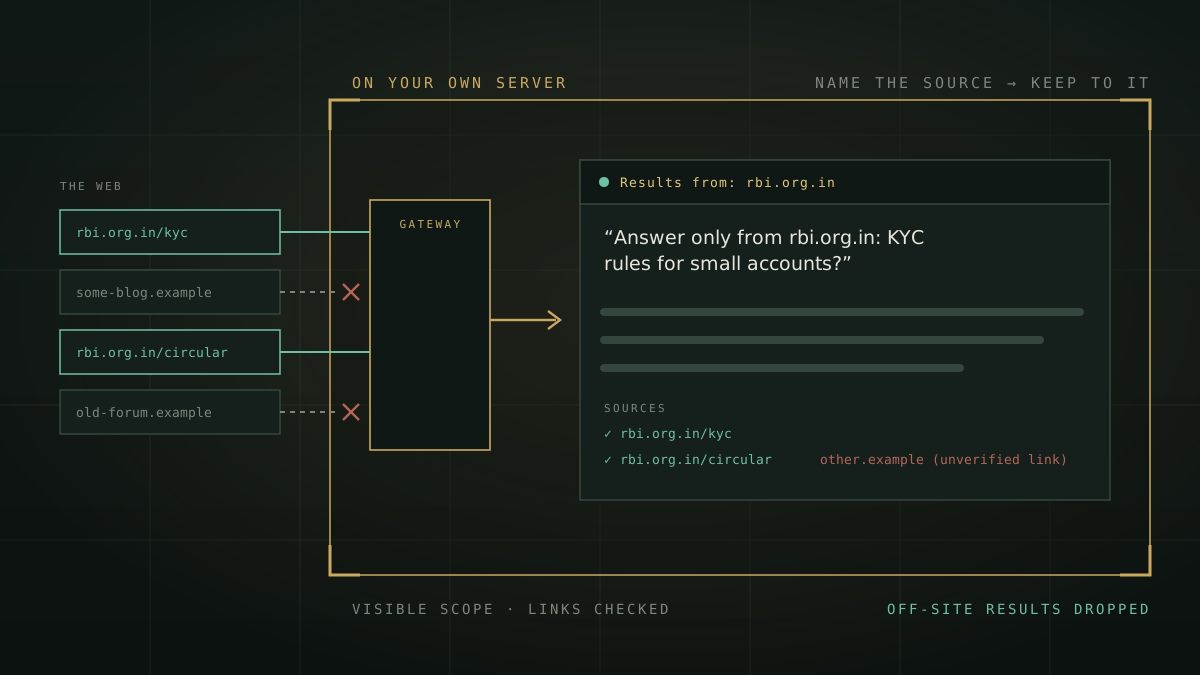
ZenithAI recognises that you’re restricting the sources, and from then on, in that chat:
- You see the scope. A line at the top of the chat reads “Results from: data.in”. It’s still there when you reopen the chat next week.
- Search keeps to those sites. When ZenithAI searches the web, results from any other site are dropped before the AI sees them, and pages outside the sites aren’t opened.
- “Not found” is allowed. When the sites have nothing on your question, ZenithAI is told so and asked to say it didn’t find it there, instead of reaching for something else.
- Links are checked. Any link in a web answer that points outside the sites, or that ZenithAI never actually opened or found, is marked “(unverified link)”. A made-up address can’t pass as a source.
- Sources are kept. Answers from web research keep the list of pages they used.
There’s nothing to configure. No admin rules, no special mode, no settings page. The scope belongs to the chat: start a new chat and you start without it.
See it on the sites your teams rely on. In a demonstration, name your regulator, a vendor or a client, and watch the chat stay on it.
Request a demonstrationWhat happens under the hood
- Recognising the request. ZenithAI only looks at a message when you’ve typed a web address or a site name in it. A small, fast model on your own server then answers one question: does the user want answers only from these sites? A site counts only if you typed it in that message; the model can’t add one. Just mentioning a link changes nothing, so “summarise this page”, “compare these two sites’ prices” or an email address won’t set a scope.
- Enforcing it in the server. The scope is applied in ZenithAI’s web gateway, the one place every web search and page read passes through. Off-site results are removed there, before they reach the model.
- Checking the answer. Once the answer is written, a plain rule (no AI involved) checks every link in it against the pages the chat actually saw and the sites you named.
We measured the recognition step on our production model. It correctly recognised all 13 site-only requests in our test set, and set no scope on any of the 25 messages that merely mentioned a link: summarising a page, comparing two sites, an email address, code, file names. It adds about a fifth of a second, and only to messages that contain a web address. That’s a small internal test, not a benchmark, but it tells you the step is fast and careful about when it switches on.
Six ways enterprise teams use it
1. Compliance: ask the regulator, not the internet
Compliance teams have to cite the authority. With the scope on, the answer’s sources come from the named regulator’s site, and anything else gets flagged. If you work in a bank, our piece on RBI’s AI rules covers why traceability matters there in particular.
2. Vendor due diligence, in the vendor’s own words
Procurement compares vendors on what they’ve published and committed to, not on reviews, reseller pages or a forum thread from 2023.
3. Client briefings before a meeting
Follow-up questions in the same chat stay on that site. Your sales and account teams walk in with what the client says about itself, not what someone else says about them.
4. Side-by-side comparisons without mixing
The chat shows both sites in its “Results from” line, and each point comes from one of them. The comparison is fair, and anyone can check it.
5. Tenders and procurement rules
Procurement and legal teams need the rules as the portal publishes them, not a summary of a summary.
6. What your own organisation has published
Marketing, HR and support teams can check what the organisation has actually said in public before repeating it to a customer.
Site scope or website knowledge: which one do you need?
ZenithAI has two related features, and they suit different jobs:
- Site-scoped chat (this post) reads a site live from the web, for one conversation. Nothing is imported. Best for a regulator’s latest page, a vendor you’re checking this week, or a client you’re meeting tomorrow.
- Website Knowledge imports a site’s pages into your organisation’s knowledge, so every relevant chat can answer from them with citations. Best for your own site, or sources your teams ask about every day. We explain that approach in turning your website into a private knowledge base.
Why this matters to an enterprise
- Traceable answers. Compliance, legal and audit teams need to show where a statement came from. A visible scope, a kept source list and marked unverified links make that possible.
- The right authority for the question. The regulator’s site for regulation. The vendor’s documentation for the vendor. The client’s website for the client.
- No mixing between sources. When you compare two organisations, each claim comes from the sites you named.
- Runs on your own servers. ZenithAI runs on your organisation’s servers, with its own models and its own search gateway. Administrators decide, user by user, who may use the internet at all. Site scope then narrows what a chat may use. It never widens it.
What it doesn’t do (yet)
We’d rather you trust the feature for the right reasons, so here are its limits:
- The scope covers what ZenithAI finds on the web. If it answers without searching, for example with web search switched off, it answers from the model’s own knowledge and there’s no web source to check.
- The scope lasts for the chat. To use other sources, start a new chat, or name the new sites in a new site-only request.
- In a site-scoped chat, a link you paste to a page on another site isn’t opened.
- Deep-research reports have their own source handling and aren’t limited by the chat’s scope yet.
To be clear, domain filters exist elsewhere too, usually as an API parameter or an admin setting. What we focused on is making the scope something any employee can switch on in plain words, and can see and check, on infrastructure you control.
Frequently asked questions
How do I make AI answer only from a specific website?
Can I limit an AI chat to two or more websites?
What happens if the website doesn’t have the answer?
How do I know the AI didn’t invent a source link?
Do administrators have to set this up?
Is this the same as importing a website into a knowledge base?
The bottom line
A fluent answer isn’t the same as a trustworthy one. When the question is about a regulation, a vendor or a client, the source matters as much as the sentence. ZenithAI lets anyone in your organisation name the source in plain words, see that the chat is holding to it, and check every link, all on servers you control.
Want to see it with your own regulator, vendors or clients? Request a demonstration, or look at the other things teams do with ZenithAI on the use cases page.