
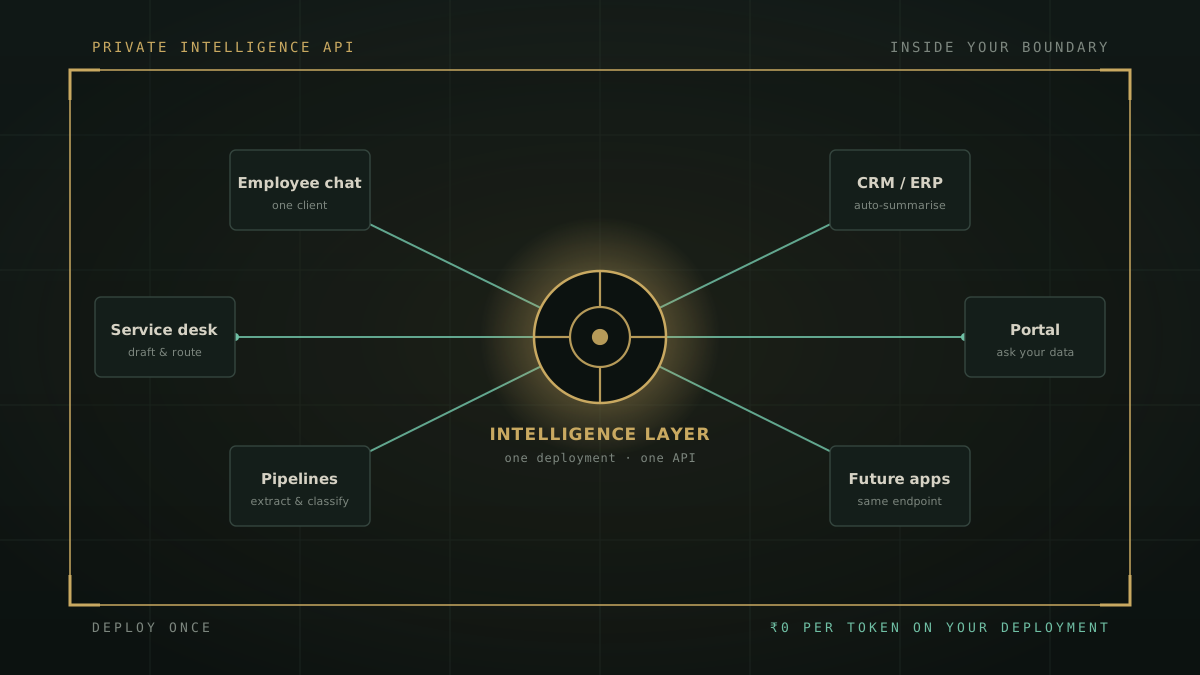
When an enterprise weighs up AI, the instinct is to count seats. How many people will use it, times a price per person, per month. That single habit quietly frames AI as a subscription for humans who chat. It is the wrong frame, and it hides the larger part of the return. When you deploy private AI, you are not just buying an AI chat window for every employee. You are standing up an intelligence layer that every application you own, today and in the future, can call.
A note before we begin. This is a product and architecture discussion, not legal advice. Where it refers to the Digital Personal Data Protection Act, 2023, it describes how architecture supports obligations, never that any product makes an organisation compliant on its own.
Chat is one client, not the product
The chat window is the most visible thing you get, so it is easy to mistake it for the whole thing. It is not. In a private deployment the chat window is simply the first application to call the underlying platform. Everything happening behind it, the models, the retrieval over your documents, the computation, the search, the extraction, sits underneath as a service. A person typing a question is one way to reach that service. It is not the only way, and for a large enterprise it is rarely the most valuable one.
This is the shift worth internalising. You are not deploying a chatbot with an API bolted on the side. You are deploying a platform, and the chat is one of its clients. Once you see it that way, the question changes from "how many people will chat" to "how many places in the business could use this intelligence." That second number is almost always far larger, and it is where the economics turn.
A per-seat subscription gives you chat per user. A private deployment gives you an intelligence layer every application can call.
What "every application gets access" actually means
On a ZenithAI deployment, everything that is user-facing is also available programmatically. Chat, search, document extraction, OCR and domain intelligence are exposed over a REST API secured with managed keys and usage tracking, reachable with single sign-on. In plain terms, the same intelligence your staff use in the chat window can be built directly into the systems they already work in. A few concrete shapes:
- A service desk that drafts and summarises tickets in place, so agents open a case and the context is already written.
- A customer or employee portal that answers natural-language questions over your own databases, scoped per workspace, without exporting the data anywhere.
- A CRM or ERP that classifies, routes and summarises records as they arrive, instead of waiting for a human to read each one.
- A back-office pipeline that runs document extraction on invoices, forms and contracts, with page structure intact, feeding your existing workflow tools.
- A future application nobody has built yet, which on day one can call the same endpoint the rest of the estate already uses.
None of these is a separate purchase. They are all clients of the one deployment, calling an endpoint inside your own infrastructure. You can see the surface of this on the platform page, which sets out how chat, search, extraction and domain intelligence are all available over the API, and in the use cases, where the same capability shows up as portals, service desks and natural-language questions over enterprise databases.
Why the ROI arrives faster
Here is the part the seat-counting frame misses. In a per-seat model, cost and value are both tied to the same lever: the number of people who log in. Add a user, pay for a user, get one more person who can chat. The meter never stops, and it grows with headcount.
A private deployment breaks that link. The large costs, the inference hardware, the platform licence and the implementation, are mostly one-time. Once the platform is running, every new application you connect draws on the same asset with no per-seat licence and no per-token meter on your own deployment. The chat users are one workload. The service desk is another. The portal, the CRM automation and the nightly document pipeline are three more. Each one raises how hard the deployment is working, while the cost of owning it stays essentially flat.
That is the whole ROI argument in one line: utilisation goes up, cost stays flat, so the one-time investment is amortised across many workloads rather than one. Payback that looked reasonable on the strength of employee chat alone arrives sooner once three or four applications are drawing on the same platform, because you paid for the capacity once and are now using it in several places at the same time. You can put your own numbers into the TCO and ROI calculator, and the fuller cost reasoning is laid out in what private AI actually costs versus per-seat SaaS.
| Per-seat SaaS AI | Private deployment (intelligence layer) | |
|---|---|---|
| What you buy | Chat, per user | An API every application can call |
| Cost driver | Number of people who log in | Mostly one-time, then maintenance |
| Adding a new use case | More seats, or a new subscription | Another client of the same deployment |
| Marginal cost per workload | Rises with usage | Near zero, no per-token meter on your deployment |
| Where the data goes | A vendor's cloud | Infrastructure you control |
The sovereignty dimension: the API stays inside your boundary
There is a second reason this matters, and it is not about money. When every application calls one deployment, that deployment is inside your own infrastructure, so the request is served by models and retrieval you control. Whether the caller is a person in the chat window or a nightly job in a pipeline, document content does not have to leave your environment to be useful.
That is a bigger deal for machine traffic than most teams first realise. Automated integrations run constantly and quietly. If they were pointed at a public model, every one of those calls would be a small, undocumented transfer of company data to someone else's cloud, multiplied by every record they process. Keeping the endpoint inside your boundary removes that default. And the same consent boundary for outbound actions that governs a person's chat, redacting private terms from anything that goes to the open web and requiring confirmation for consequential sends, governs the application traffic too. For an Indian enterprise this is where the API story meets the DPDP story: residency and accountability become properties of your architecture rather than a setting in a supplier's console. The security and governance page sets out how each control is built.
How to think about it: rented seats or owned mains
The cleanest way to hold the two models in your head is an old one. A per-seat AI subscription is like buying every worker their own battery. It works, it is quick to start, and the bill grows with every person and every device you add. An owned intelligence layer is like wiring a supply into the building. You pay to bring the mains in once, and then the lighting, the machines and anything you install next simply draw on it.
Nobody prices electricity by the employee, because electricity is infrastructure and its value comes from how many things can plug into it. Enterprise AI is heading the same way. The organisations that get the most out of it will be the ones that stop asking how many people will chat, and start asking how many parts of the business can draw on the same intelligence. That is the question a private deployment is built to answer, and it is the reason the return compounds instead of recurring.
Deploy once, serve the estate
Employee chat is a good place to start, and it is often the visible win that justifies the first deployment. But it is the beginning of the return, not the whole of it. The platform you stand up for chat is the same platform your service desk, your portals, your CRM and the applications you have not built yet can call. Deploy once, and the intelligence reaches across the estate. That is what turns AI from a per-user cost into an owned asset, and it is why the ROI arrives faster than a seat-by-seat comparison would ever suggest.
If you want to see the API working against your own systems and a real use case, request a demonstration, or get in touch. You can also read how it is deployed inside your environment and run the numbers in the TCO and ROI calculator.