
An AI answer arrives with three tidy links underneath and a note that says it searched the web. It feels checked. But the links prove only that a search happened. Whether the figures in the answer came from those pages, or from the model's own memory, is a separate question, and the answer rarely tells you which.
The gap between searching and using
A web answer is made in two steps. A search step finds and reads pages. A writing step produces the answer you see. The two are connected, but not tightly. The writing model has read a great deal during its training, and when the pages are thin, off topic or missing, it can write a fluent answer anyway. The links still appear, because a search did run.
The research has been blunt about how much this matters. A study published in April 2026 in the Annals of the Royal College of Surgeons of England checked 1,249 references from chatbot answers and found that, in the worst-performing models, 34% were fabricated or unverifiable, while some platforms produced none. Other 2026 work has drawn the same line we draw here: citing a page is not the same as using what it says.
We saw the quieter version of the problem in our own product. When a web search returned nothing usable, the answer model still wrote market figures, such as a per-employee price range or a typical commission, in four of five test cases. Nothing was wrong with the search. The answer simply did not say that the search had come back empty.
The most misleading answer is not the one with no sources. It is the one with sources that did not contribute anything to it.
The line under every web answer
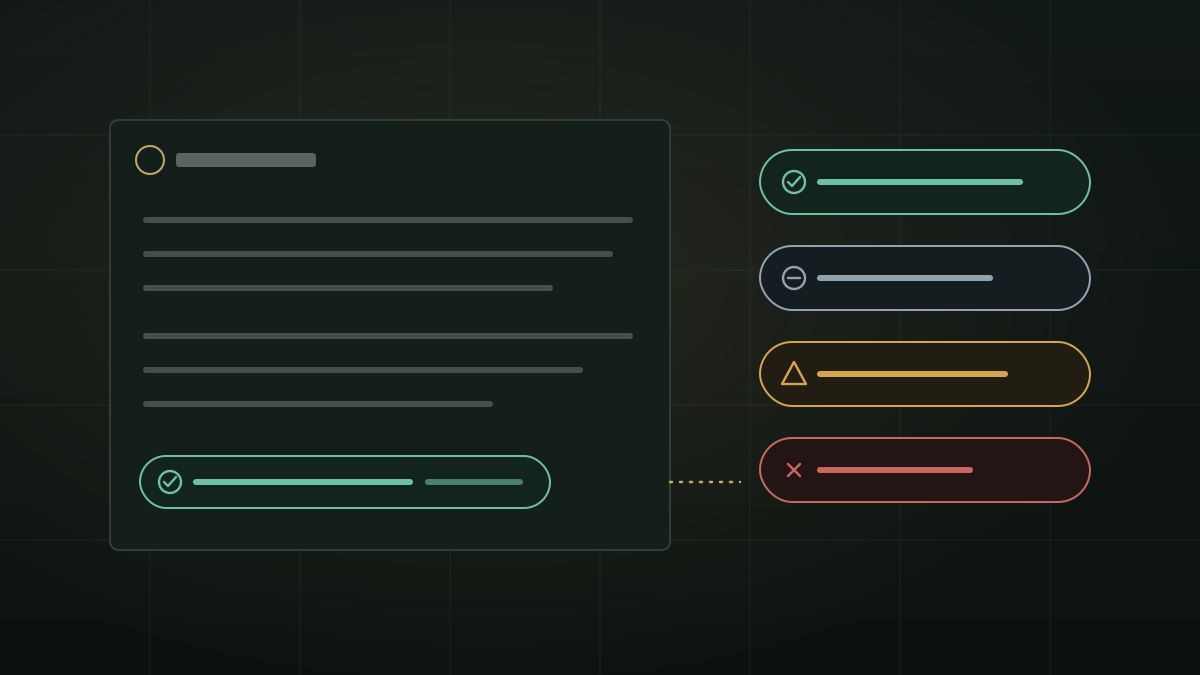
So we added one plain line under every chat answer for which a web search ran. It is built from the saved record of what the search actually did: which pages were read, which ones the answer cites, whether the search finished. No AI model writes it, so it cannot be talked into a better story.
| The line | What happened | What to do |
|---|---|---|
| Green: searched the web, cited and the number of pages | The answer links the pages it used, listed under Sources | Spot-check the figure that matters most against its page |
| Blue-grey: searched the web, but none of the pages was used | Pages were read, but the answer does not rely on them | Treat the answer as general knowledge; open Pages read to see what was found |
| Amber: searched the web, no usable pages found | The search found nothing ZenithAI could use | Treat any figure as unchecked; ask again in other words |
| Red: web search did not complete | The search stopped before it finished | Treat the whole answer as unchecked and try again |
On blue-grey, amber and red, the line also says where the answer did come from: your chat, any files you shared, and the model's own knowledge. It uses icons and words as well as colour, so it reads the same for people who do not see the colours. Answers that never searched the web have no line at all, which is its own signal.
When the search finds nothing, the answer says so
A line under the answer is easy to miss when you copy the text into an email. So when a search finds nothing usable, the chat answer itself now ends with one sentence: No relevant web pages were found for this request. Any market figures or comparisons above come from the model's general knowledge and were not checked on the web. It travels with the answer into the Word and Markdown downloads.
Two honest limits. When the search did not complete (the red line), the answer does not carry this sentence, and those answers can still contain invented figures; the red line is your warning there. And the sentence is added to answers in the chat window, not to answers returned through the API.
Ask where it came from, and get the record
After a web answer, you can simply ask: what are your sources? Left to itself, a model answers that question from memory, which is exactly where invented references come from. ZenithAI answers it from what was saved with the answer: Sources used for that answer, then Also read, not cited in the answer, each with the page links. It works in normal chats and in chats with an attached document. Ask right after the answer; if another message without a web search comes in between, the list may not be found.
How to check any AI answer, in any tool
- Pick the one figure that matters. A price, a date, a limit. Do not try to verify everything.
- Open the cited page and find that figure. If it is not there, the citation is decoration.
- Look for distinctive details. A specific model number or an unusual phrase that appears in both the answer and the page is good evidence the page was used.
- Be wary of round, confident ranges with no citation next to them. They are the typical shape of a model filling a gap.
- Prefer tools that say what they did not check. An answer that admits an empty search is worth more than one that hides it.
For questions where you want answers only from sources you trust, a site-locked chat that answers only from the websites you name narrows the field further. And when the question involves your own documents, see what leaves when AI searches the web about your document.
Availability
The line under web answers, the no-usable-pages sentence and the sources answer in document chats went live on our servers on 22 October 2026. They are not in installer 4.6.0 and come with the next installer.
Questions
How can I tell if an AI answer actually used its web sources?
Open the cited page and look for the exact figure or name the answer relies on. A link alone proves only that a search ran.
Why does an AI give figures when its search found nothing?
The writing model fills the gap from its own knowledge. ZenithAI now ends such chat answers with a sentence saying no relevant pages were found and the figures were not checked on the web.
What does the coloured line under a ZenithAI answer mean?
Green: pages cited. Blue-grey: pages read but not used. Amber: nothing usable found. Red: the search did not complete. It is built from the saved record of the search, not by the model.
If you want to see this on questions from your own work, request a demonstration, or get in touch.