
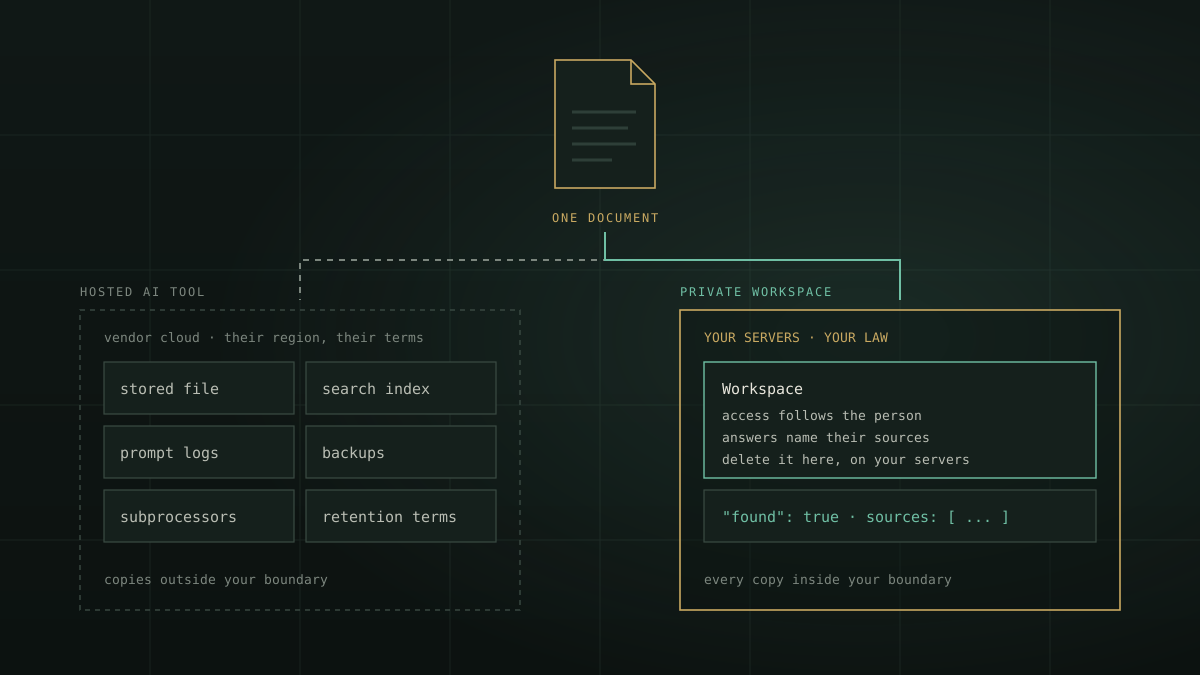
“Chat with your documents” sounds like one action. It isn’t. The moment a policy, a contract or a customer file is uploaded to an AI tool, it is copied, parsed, indexed, quoted into prompts, logged and backed up. Each copy lives somewhere, under someone’s law, for some length of time. This article follows one document through that journey, compares a hosted AI document tool with a private workspace at every step, and gives you ten questions to put to any provider before your organisation’s knowledge goes in.
A note before we begin. This is an architectural view, not legal advice. It stays at the category level: “hosted AI document tool” means any AI service that keeps your files on the provider’s infrastructure, and providers differ widely in their terms. Read each provider’s own documents; the questions below tell you what to look for.
The life of one document
Take a single file: your organisation’s leave policy, or a signed supplier contract. To answer questions about it, any AI system has to do the same seven things. What differs is where each one happens and who controls the result.
| Step | Hosted AI document tool | Private ZenithAI workspace |
|---|---|---|
| 1. The file is stored | On the provider’s cloud, in the region and under the terms they offer | On your organisation’s own servers |
| 2. Text is extracted, scans are read | By the provider’s services, sometimes by a subprocessor | On your servers, OCR included |
| 3. A search index is built | A second copy of your content, in the provider’s systems | Inside the workspace, on your servers |
| 4. A question pulls passages into a prompt | Sent to the provider’s model | Sent to the model running on your servers |
| 5. The answer is written | By the provider’s model | Only from the workspace documents, with sources, and “not found” when they don’t say |
| 6. Logs and backups | Kept under the provider’s retention terms | Under your own retention; server logs hold ids and counts, not questions, answers or document names |
| 7. Deletion and exit | A request to the provider, and their word that every copy is gone | Delete it in the workspace, on infrastructure you control |
Neither column is careless by default. Many hosted services offer strong contractual terms. The difference is that on the left, every safeguard is a promise you verify through contracts and audits; on the right, most of them are a fact of where the system runs.
The laws that follow the copies
The provider’s home law. The US CLOUD Act, codified at 18 U.S.C. § 2713, requires US providers to disclose data in their “possession, custody, or control”, “regardless of whether” it is stored inside or outside the United States. Storing data in an Indian region doesn’t by itself take it out of a foreign provider’s reach. Who controls the copies matters as much as where they sit.
Your own accountability. India’s Digital Personal Data Protection Act, 2023 keeps the organisation responsible for processing done on its behalf by a data processor (section 8(1)), allows processors only under a valid contract (8(2)), and requires reasonable security safeguards to prevent a personal data breach (8(5)). Failing that last duty can draw a penalty of up to ₹250 crore. Section 16 lets the government restrict transfers to notified countries. The DPDP Rules were notified in November 2025, with most obligations applying from 13-05-2027. Every AI vendor that holds your documents is one more processor in that chain. (Our DPDP countdown checklist has the dates.)
Logs and incidents. CERT-In’s Directions of 28 April 2022 require logs to be kept for a rolling 180 days within Indian jurisdiction, and cyber incidents to be reported within six hours of noticing them.
Sector rules. For banks and NBFCs, the RBI’s Master Direction on Outsourcing of IT Services (April 2023) expects contracts to cover where data is stored, gives the regulated entity, its auditors and the RBI unrestricted and effective access to data held by service providers and their sub-contractors, and asks for an exit plan. For government departments, MeitY’s guidelines for procuring cloud services expect data functions and processing within India’s boundaries.
None of these forbids hosted AI. All of them make each copy of a document something to contract for, secure, log and answer for. Gartner expects that by 2027 more than 40% of AI-related data breaches will come from improper cross-border use of generative AI (February 2025).
Ten questions to ask any AI document tool
These come from the frameworks security and procurement teams already use: the OWASP Top 10 for LLM Applications 2025 on sensitive information disclosure, the RBI outsourcing direction, CERT-In and the DPDP Act. Put them to every provider, including us.
| Question | With a private ZenithAI workspace |
|---|---|
| 1. Where are the files, the search index and the logs physically stored? | On your servers, all three |
| 2. Which country’s law can compel the provider to hand them over? | Yours: the data sits on infrastructure you control |
| 3. How long are documents, prompts and answers kept, and can you verify deletion? | Questions and answers through the API are not stored; documents stay until you delete them |
| 4. Is your data used to train or improve models? | The models run on your hardware; your documents don’t leave it |
| 5. Who are the subprocessors? | No outside AI service sits in the path |
| 6. Does the tool respect who may see which document? | Yes. Personal workspaces are private; organisation workspaces open to chosen people; an API key sees what its owner can open |
| 7. What is logged, where, and for how long? | On your servers, under your retention; logs record ids and counts, not content |
| 8. Can your auditors and regulators get to the data? | It is in your own environment |
| 9. What happens when the answer isn’t in the documents? | It says so and names the documents it checked; the API returns found: false |
| 10. How do you leave? | Your documents never left your servers, so there is nothing to retrieve from a third party |
What a workspace gives you beyond privacy
Keeping documents inside your boundary is the starting point, not the whole case. The workspace journey adds capabilities that make the knowledge useful as well as safe.
- Answers only from your documents. In a workspace chat, facts come from the workspace, not from the model’s general knowledge. The web is used only when a person asks, and every such search is logged.
- Sources and an honest “not found”. Each answer names the documents behind it. When they don’t cover the question, it says so instead of guessing.
- Access that follows the person. A workspace another person made doesn’t just refuse access, it doesn’t appear. Organisation workspaces are run by managers who choose who may use each one. See sharing a workspace in the docs.
- Numbers calculated, not guessed. Spreadsheets are kept as tables, so a total or an average comes from the data.
- Three ways in. Upload in the app, import pages from a website, or let your own software add files through the API as they are approved. See adding a document through the API.
- One body of knowledge for people and software. The same workspace answers staff in chat and your intranet, help desk or branch app through the Enterprise Knowledge API. The developer workspace guide has working code.
- No meter on asking. On your own deployment there is no per-token or per-user bill, so you can let every team ask without counting questions.
When a hosted tool is still the right call
If the documents are already public, if nothing personal or confidential is involved, or if a small team is still testing whether AI answers help at all, a hosted tool can be the quickest start. Many organisations will run both, deliberately: hosted for public material and experiments, private for the policies, contracts, customer files and internal records that carry legal and reputational weight. Our private AI vs cloud AI framework helps you decide workload by workload.
Start with one workspace
- Pick one body of knowledge with an owner, such as HR policies or branch circulars, and remove superseded versions.
- Create the workspace and add the documents. The docs walk through it: Workspaces: create, add documents, ask.
- Decide who may use it. Keep it personal, or make it an organisation workspace with chosen members (organisations and managers).
- Ask 50 real questions and count how often the answer was found, right and correctly sourced.
- Connect one application through the API, with a key from an account that sees only that workspace.
Questions
Is it safe to upload company documents to a cloud AI tool?
Does storing data in an Indian cloud region keep it under Indian law?
Who is responsible under the DPDP Act when an AI vendor processes our documents?
What is a private AI workspace?
When is a hosted AI document tool the better choice?
Where to take it
If your documents are the kind that can’t leave the building, request a demonstration and bring a few of them. We will build a workspace with you and ask it, including a question it can’t answer. Related reading: where enterprise AI leaks, sovereign AI in India and a private internal knowledge base.